
Advanced-Microsoft-Excel-in-Ikeja-Lagos-Nigeria

Advanced Microsoft Excel Training in Port Harcourt Nigeria

Microsoft Excel is one of the most popular applications for data analysis. Equipped with built-in pivot tables, they are without a doubt the most sought-after analytic tool available. It is an all-in-one data management software that allows you to easily import, explore, clean, analyze, and visualize your data. In this Microsoft Excel Training in Port Harcourt Rivers State Nigeria, we will discuss the various methods of data analysis in Excel.


One of the many uses of Excel is to facilitate data entry. Error-free data entry is essential to accurate data analysis. Excel provides several methods for entering your data. Data sets can be entered manually from the keyboard or retrieved from a text file, database, or online Web sources. You can also have Excel automatically enter patterns of data for you, saving you the trouble of creating these data values yourself. You’ll study all of these techniques in this Microsoft Excel training in Port Harcourt, Rivers State Nigeria, but first you’ll work on entering data from the keyboard.


Microsoft Excel performs statistical function, which is the bedrock for data analysis. Statistics provides a way to study how people and things respond to the world and, as such, it’s a fascinating, annoying, and sometimes contrary field to work in.


Advanced-excel-training-in-Ikeja


Descriptive statistics in particular seems to exercise a peculiar hold over some people. Some sports fans are able to rattle off the yearly betting averages, quarterback ratings, and/or assists per game achieved by their favorite players.


In the closely related area of inferential statistics, there are specialties such as test construction that depend heavily on the measurement of means, standard deviations, and correlations to create tests that not only measure what they are supposed to but do so with good accuracy.


Running A Statistical Test

A large number of questions in the areas of business, manufacturing, medicine, social science, gambling, and so on are based on situations in which there are just two typical outcomes: succeeds/fails, breaks/doesn’t break, cures/sickens, Republican/Democrat, wins/loses. In statistical analysis, these situations are termed binomial: “bi” referring to “two,” and “nomial” referring to “names.”

Several hundred years ago, due largely to a keen interest in the outcomes of bets, mathematicians started looking closely at the nature of those outcomes. We now know a lot more than we once did about how the numbers behave in the long run. And you can use that knowledge as a guide to an answer to the question posed earlier: How likely is it that there are at most 10 defectives in the production lot of 1,000 phones, when you found two in a sample of just 50?


Framing the Hypothesis

Start by supposing that you had a population of 100,000 phones that has 1,000 defectives—thus the same 1% defect rate as you hope for in your actual production lot of 1,000 phones.

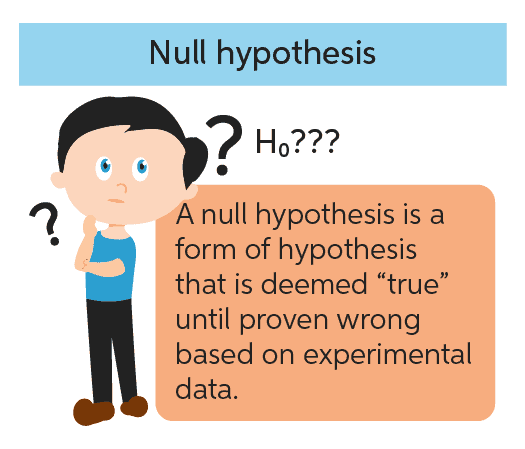
This sort of supposition is often called a null hypothesis. It assumes that no difference exists between two values, such as a value obtained from a sample and a value assumed for a population; another type of null hypothesis assumes that no difference exists between two population values. The assumption of no difference is behind the term null

hypothesis. You often see that the researcher has framed another hypothesis that contradicts the null hypothesis, called the alternative hypothesis.


Data-Analytics-Training-in-Ikeja-Lagos-Nigeria


Types of tests in Advanced Microsoft Excel

  • One Way ANOVA
  • T-Test
  • Descriptive Statistics
  • Regression
  • Correlation
  • Z-Test
  • Sampling
  • Exponential Smoothing
  • Moving Average
  • Pivot tables
  • Vlookup


Advanced Microsoft Excel Advantages

  1. Easy to store data: In MS Excel, it is easy to store the data, perform calculations, format the cells and adjust layouts to generate the output and reports to share with others. Many templates make it easy to accomplish a wide range of tasks.


  1. Analysis of large amounts of data: MS Excel spreadsheet enhance your ability to analyze large amounts of data. It provides many analytical tools for the accurate analysis of large amounts of data. With powerful filtering and sorting tools allow you to sort out a large amount of data, it will be easier for you to find out the required information and will assist in your decisions and filtering removes repeated data and helps to save time and effort.


  1. Used for Formulas: Microsoft Excel performs all mathematical and logical functions like addition, subtraction, multiplication, division, average, etc. It provides many formulas that help you to solve both simple and complex calculations.


  1. Graphical Representations of data: It allows you to create the visual representation of data and information. The data can be visually displayed in the form of bar charts, column charts, and graphs.


  1. Secure: Microsoft Excel files can be password protected for security. A user can create a password within the Excel file.
Power-BI-Training-in-Ikeja-Lagos-Nigeria

Power BI Training in Port Harcourt Nigeria

What is Business Intelligence (BI)?

Business intelligence is the delivery of accurate, useful information to the appropriate decision makers within the necessary time frame to support effective decision making.

The goal of a business intelligence project is better decisions.


Power BI as a Business Intelligence Tool

Microsoft Power BI is not a single tool. It is important to understand this fact as you plan to enroll in our programme that provides you with business intelligence using Power BI.

Instead, Power BI is a set of tools. These tools began their lives as separate entities existing in a couple different environments. After several iterations and machinations,

Microsoft brought these tools together into a single environment—the tool chest we call Power BI.


The Business Intelligence Process

1. Gather

For ease and speed of analysis, data is gathered from various sources and placed in a single location. As data is gathered, it is also transformed. This transformation results in data that is cleansed of errors and inconsistencies. The transformation also aligns the data with the rest of the data store, allowing it to function as a consistent whole.


2. Store

The transformed data is stored in a specific location. This data store is often referred to as a data warehouse or data mart. The difference between these two is really a matter of scope. A data warehouse attempts to bring together data from across the entire organization, whereas a data mart brings together data that is limited to a particular subject area within the organization—sales or production, for example.


Data in the data warehouse or data mart is stored in a specialized format specifically designed to allow for quick retrieval during reporting and analysis. It is also structured so thousands or millions of individual transactions can be

efficiently added together (aggregated) to determine, for example, the number of products produced in a given month or the total sales in a given year. This type of data store is said to be optimized for online analytical processing (OLAP).


Business-Intelligence-Training-in-Lagos-Nigeria

3. Model

To get the best of Power BI training in Port Harcourt, Rivers State Nigeria, a data model is built on top of the data store to serve two purposes. First, it presents the data to the business user in a manner they are familiar with—no weird table and field names to decipher, and no complex language required to query the data.


Second, it provides a single location to store business calculations which is an important aspect thought as part of the Power BI training in Port Harcourt, Rivers State Nigeria. Those internal formulas used to determine things like cost of goods sold, mean time between failure, and days beyond terms can be placed in a single location. When those calculations are needed within a report or on a dashboard, they are pulled from the data model, not re-created over and over again.


4. Visualize

Once the data is available in a model, it is ready for analysis and discovery. This is done by creating charts, tables, and gauges on reports and in dashboards. Some data visualizations will be created for one-time use as the data model is explored to answer a very specific question. Other visualizations will be created to be shared with many users or colleagues studying Power BI training in Port Harcourt, Rivers State Nigeria and referred to again and again.


Why You Should Undergo Power BI Training at Port Harcourt Data School

Port Harcourt Data School is a learning institute that provides a variety of management and tech based training for professionals and corporate organizations. Our portfolio as a top-tier training institute has placed as No. 1 choice centre for professionals who are pivoting into tech, we provide support from the very fundamental as well as possible opportunity to intern with partner organizations in order to validate the knowledge imparted. Our instructors are certified professionals with different train-the-trainer regular experience in order to boost the learning experience with students. We ensure learners get the best of value for their money by providing a conducive environment for learning, developing project based exercises as well as equipping them with relevant premium learning resources.

Hi, How Can We Help You?
Welcome To
Portharcourt Data School

Artificial Intelligence (AI) and Robotics Programmes Are Now Available!

Enroll Now!

Thank You
100% secure website.