
The Best Training Centers in Port Harcourt Is Right Here

Port Harcourt has many training centres. However, not all of them deliver real results. Some focus on theory. Others lack structure. As a result, many students finish without job-ready skills.

In contrast, one institution takes a different approach. Port Harcourt Data School focuses on practical learning and clear outcomes. Because of this, it stands out as the best training centre in Port Harcourt.

The Growing Demand for Skills in Port Harcourt

Port Harcourt continues to grow as a commercial city. At the same time, industries are changing. Today, companies rely more on technology and data.

Because of this shift, the demand for digital skills is rising fast. For example, businesses now need data analysts, developers, and tech-savvy professionals. However, many training centres have not adapted. Therefore, students often struggle to meet market demands.

What Makes a Training Centre Truly Effective?

Not every training centre meets modern standards. First, a good centre must teach relevant skills. Next, it should focus on practical learning. In addition, students should build real projects.

Also, strong mentorship matters. Without guidance, learning becomes difficult. Finally, a clear path to employment is important. Because of these factors, choosing the right centre is critical.

Meet Port Harcourt Data School

A Training Centre Built for Results

Port Harcourt Data School takes a focused approach. It specialises in data and tech skills. Therefore, students gain deep and relevant knowledge.

The school uses hands-on training. Students work with real tools and datasets. As a result, they understand how tasks are done in real jobs.

In addition, lessons are simple and structured. So, beginners can follow with ease. Then, they progress to advanced topics step by step.

Courses That Match Industry Needs

Port Harcourt Data School offers courses that align with current demands. For example:

  • Data Science: Students analyse data and build models.
  • Data Analytics: Students find trends and support decisions.
  • Python Programming: Students write code for real tasks.
  • Business Intelligence: Students create dashboards and reports.
  • SQL & Databases: Students manage and query data.

Because these skills are widely used, graduates can work in many industries.

Why Port Harcourt Data School Is the Best

7 Clear Advantages

1. Specialised Focus
The school focuses on data skills. Therefore, students gain depth instead of surface knowledge.

2. Practical Learning Approach
Students solve real problems. As a result, they build confidence quickly.

3. Beginner-Friendly Structure
Courses start with simple concepts. Then, they move to advanced levels.

4. Portfolio Development
Students complete projects during training. So, they graduate with proof of their skills.

5. Experienced Instructors
Teachers bring real-world experience. Because of this, lessons stay relevant.

6. Supportive Learning Environment
Students learn together and receive guidance. In addition, mentorship continues after training.

7. Fast Career Path
Students become job-ready in months. Therefore, they can enter the workforce quickly.

Real Impact on Students

Many students start with no experience. However, they gain strong skills through structured learning. As a result, they move into tech roles faster.

Graduates often secure remote jobs or freelance work. In addition, some support local businesses with data solutions. Therefore, the impact goes beyond the classroom.

The Bigger Picture

Why Tech Training Matters Now More Than Ever

Technology continues to shape every industry. For example, finance, healthcare, and retail all depend on data. Because of this, digital skills are now essential.

In Nigeria, opportunities in tech keep growing. However, there is still a shortage of skilled professionals. Therefore, the right training centre can make a huge difference.

Port Harcourt Data School helps close this gap. It trains individuals who can compete locally and globally. In addition, it supports the growth of the city’s tech ecosystem.

Start Your Journey Today

Choose the Right Training Centre

Choosing a training centre is an important decision. However, the best choice is clear. Port Harcourt Data School combines practical learning, expert guidance, and real results.

So, if you want to build a strong career, take the next step. Learn relevant skills. Build real projects. And position yourself for global opportunities.

Your future in tech can start today in Port Harcourt by clicking the linkhttps://www.portharcourtdataschool.com


Comprehensive Training on Microsoft Word in Port Harcourt

In today’s digital world, strong computer skills are essential. They support both personal growth and career success. Among these skills, Microsoft Word remains one of the most widely used tools. It helps users create documents, reports, and official communication with ease.

As a result, individuals in Port Harcourt who master Microsoft Word gain a strong advantage in the job market. They work faster, present better documents, and stand out to employers.

For anyone who wants structured and practical learning, Portharcourt Data School provides a reliable and results-driven training experience.

What the Training Is About

The Microsoft Word training program is designed to build skills step by step. It starts from the basics and moves to advanced features. This approach helps learners understand the software clearly.

At Portharcourt Data School, students gain hands-on experience in:

  • Creating and editing documents
  • Formatting text and applying styles
  • Setting up pages and layouts
  • Inserting tables, images, and shapes
  • Performing mail merge for bulk tasks
  • Reviewing and proofreading documents

In addition, lessons are practical and easy to follow. Therefore, learners can apply their knowledge immediately in real-life situations.

Importance of Having the Training

Microsoft Word training is important for anyone who wants to work efficiently. Although many people use the software, not everyone uses it well. This often leads to poorly formatted documents.

However, with proper training:

  • You complete tasks faster
  • You produce clean and professional documents
  • You improve your productivity
  • You build confidence in your work

Furthermore, employers prefer candidates who can work independently. They value people who deliver accurate and well-structured documents.

Why Microsoft Word Skills Are Required

Today, Microsoft Word is used in almost every workplace. It plays a key role in communication and documentation.

For example, employees use it to write reports, prepare proposals, and create official letters. In addition, records are often stored and managed using Word documents.

Because of this, many employers require Microsoft Word skills. Therefore, learning this tool increases your chances of getting hired.

Organizations That Need This Skill

Many industries depend on Microsoft Word for daily operations. These include:

  • Corporate organizations
  • Government offices
  • Schools and universities
  • Legal firms
  • Hospitals and healthcare centers
  • Small businesses

In these settings, staff must create accurate and well-organized documents. As a result, Microsoft Word skills remain highly valuable.

Job Opportunities After the Training

After completing the training, many job opportunities become available. These roles often require strong document handling skills.

For instance, you can work as:

  • Administrative Assistant
  • Secretary
  • Office Clerk
  • Data Entry Officer
  • Personal Assistant
  • Customer Service Officer

Moreover, freelance opportunities are also available. Many companies need remote workers for document editing and formatting tasks.

What Is Expected After the Training

After completing your training at Portharcourt Data School, you should be confident in using Microsoft Word.

You will be able to:

  • Create professional documents
  • Apply advanced tools like templates and mail merge
  • Edit and proofread efficiently
  • Work with little supervision
  • Meet workplace standards

As a result, you become ready for both employment and self-employment.

Why Choose Portharcourt Data School

Portharcourt Data School focuses on practical and career-based learning. The training is designed to meet real workplace needs.

Instructors guide students step by step. They explain each concept clearly and provide support throughout the course. In addition, students practice regularly, which improves understanding.

Why Portharcourt Data School Is the Best Choice

Choosing the right training center is very important. Fortunately, Portharcourt Data School offers several key benefits.

Practical Learning Approach

Students learn by doing. Therefore, they gain confidence quickly.

Experienced Instructors

Experts teach each course. They provide clear guidance and useful insights.

Beginner-Friendly Environment

Lessons are simple and easy to follow. As a result, beginners can learn without stress.

Updated Training Content

Students learn modern and relevant skills. This keeps them ready for current job demands.

Flexible Learning Schedule

Classes are flexible. This allows both students and workers to attend conveniently.

Focus on Job Readiness

Training prepares students for real work situations. Therefore, they become job-ready.

Support After Training

Learning does not stop after the course. Students receive guidance as they start applying their skills.

Final Thoughts

Microsoft Word is more than a basic tool. It is a key skill for career growth. When you learn it properly, you improve your productivity and job prospects.

Therefore, enrolling at Portharcourt Data School is a smart decision. It can help you build a strong and successful future.

SPSS-training-in-Lagos-Nigeria

SPSS Training in Port Harcourt Nigeria

SPSS for Advanced Analytics

SPSS was developed to do most major types of data analysis using SPSS. The software was originally created by three Stanford graduate students in the late 1960s. The acronym “SPSS” initially stood for “Statistical Package for the Social Sciences.” As SPSS expanded their package to address the hard sciences and business markets, the name changed to “Statistical Product and Service Solutions.” In 2009 IBM purchased SPSS and the name morphed to “IBM SPSS Statistics.” SPSS is now such a standard in the industry that IBM has retained the name due to its recognizability. No one particularly cares what the letters “SPSS” stand for any longer. IBM SPSS Statistics is simply one of the world’s largest and most successful statistical software companies.


The SPSS Environment

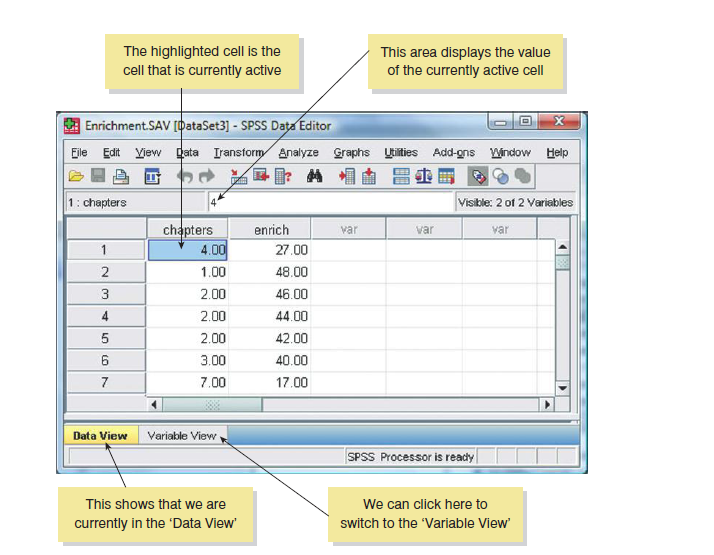
SPSS mainly uses two windows: the data editor (this is where you input your data and carry out statistical functions) and the viewer (this is where the results of any analysis appear). There are several additional windows that can be activated such as the SPSS Syntax Editor, which allows you to enter SPSS commands manually (rather than using the window-based menus). For many people, the syntax window is redundant because you can carry out most analyses by clicking merrily with your mouse.


Once SPSS has been activated, a start-up window will appear, which allows you to select various options. If you already have a data file on disk that you would like to open then select Open an existing data source.


Functions of the various features in SPSS


SPSS Advanced analytics training in Ikeja Lagos Nigeria


File: This menu allows you to do general things such as saving data, graphs or output. Likewise, you can open previously saved files and print graphs data or output. In essence, it contains all of the options that are customarily found in File menus.


Transform: For example, you can use recode to change the values of certain variables (e.g. if you wanted to adopt a slightly different coding scheme for some reason). The compute function is also useful for transforming data (e.g. you can create a new variable that is the average of two existing variables). This function allows you to carry out any number of calculations on your variables.


Analyze: The fun begins here, because the statistical procedures lurk in this menu. This feature houses majority of the statistical tests in SPSS.


Defining Your Hypothesis in SPSS

Scientific statements, as we have seen, can be split into testable hypotheses. The hypothesis or prediction that comes from your theory is usually saying that an effect will be present. This hypothesis is called the alternative hypothesis and is denoted by H1. (It is sometimes also called the experimental hypothesis but because this term relates to a specific type of methodology it’s probably best to use ‘alternative hypothesis’.) There is another type of hypothesis, though, and this is called the null hypothesis and is denoted by H0. This hypothesis is the opposite of the alternative hypothesis and so would usually state that an effect is absent.


Taking our Productivity example that we might generate the following hypotheses:


Alternative hypothesis: Men will score higher on productivity questionnaires than women.

Null hypothesis: Men will not score higher than women with respect to productivity.


Why You Should Learn SPSS Advanced Analytics From Port Harcourt Data School

  • Gives accurate expression about quantitative method of analysis
  • An understanding of advanced analytics whose basis is fundamental statistics
  • Helps to define various statistical models for generating acceptance or rejection range.
Hi, How Can We Help You?
Welcome To
Portharcourt Data School

Artificial Intelligence (AI) and Robotics Programmes Are Now Available!

Enroll Now!

Thank You
100% secure website.